Rowell BlancaSoftware Engineer
WordPress plugin· Live in production

BuildForUser Login Customizer — WordPress Plugin

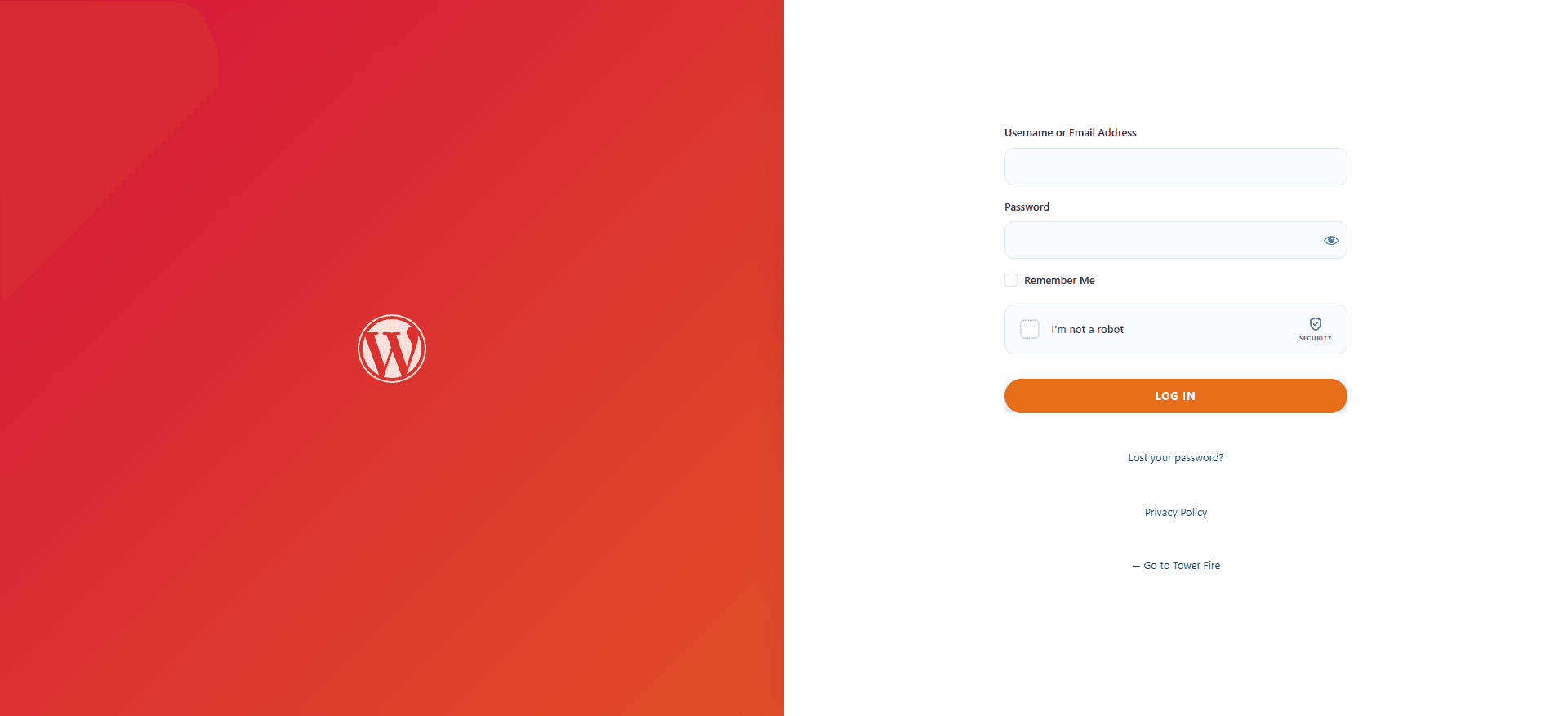
Bespoke WordPress login screen customizer featuring a premium split-panel interface, live logo/background/colour-scheme editing, and a secure login URL renaming tool to obscure the default wp-login.php path.

Client
Direct client build
Role
Senior Full-Stack Engineer
Timeline
Delivered in sprints
Region
United States
  • Wordpress Plugins
  • PHP
  • Security
  • Admin UI
  • JavaScript
wp-content/plugins/buildforuser-login-customizer
4 Feature Screenshots GalleryWordPress Plugin
<?php // WordPress Plugin Architecture & Workflow SpecTested & Passed • PHP 8.4

// BuildForUser Login Customizer — WordPress Plugin

Bespoke WordPress login screen customizer featuring a premium split-panel interface, live logo/background/colour-scheme editing, and a secure login URL renaming tool to obscure the default wp-login.php path. HOW IT WORKS: 1. Split-Panel Login UI: Replaces the default WordPress login screen with a branded split-panel design — left column shows a customizable hero/branding panel, right column shows the login form. 2. Live Customizer Settings: Logo upload, background image/colour, accent colours, and tagline are all configurable from the WordPress admin dashboard without touching code. 3. Secure Login URL Renaming: Registers a custom login slug (e.g. /admin-access) and redirects the default /wp-login.php to a 404 — reducing brute-force attack surface on the login page. 4. Dashboard Integration: Settings surface is integrated into the BuildForUser Dashboard admin menu, sharing the same branding and UI shell as the rest of the plugin suite.

Interactive Plugin Screenshots Gallery (4 Screenshots)

Slide 1 of 4
Gutenberg Editor
Screenshot 1 • Visual Gutenberg Schema Builder

Visual JSON-LD block editor directly inside the WordPress Gutenberg post editor.

Screenshot 1 • Visual Gutenberg Schema Builder
BuildForUser Login Customizer — WordPress Plugin • Screenshot 1

> Executing Gutenberg Editor Module

Visual JSON-LD block editor directly inside the WordPress Gutenberg post editor.

How This Plugin Works (Core Architecture Workflow)

Step 1 • Visual Editor

Gutenberg & Global Builder

Configure JSON-LD schema blocks directly inside the WordPress editor and global settings dashboard.

Step 2 • Graph Engine

SchemaGraphAssembler

Modular PHP pipeline merges global and post schemas, deduplicating @id tags into a single valid @graph JSON-LD script.

Step 3 • AJAX Preview

Instant Admin Preview

Generates real-time previews of JSON-LD script tags directly within the admin editor without page reloads.

Step 4 • SEO Gate

Yoast & SEO Coordination

YoastSchemaGate coordinates output with Yoast SEO or All-in-One SEO to eliminate schema syntax conflicts.

Key Plugin Capabilities

  • Custom WP Database Tables & Migration Hooks
  • AJAX & REST API Endpoint Controllers
  • Nonces, Data Sanitization & Escaping

Technology & Integrations

Wordpress PluginsPHPSecurityAdmin UIJavaScript

Overview

HOW IT WORKS: 1. Split-Panel Login UI: Replaces the default WordPress login screen with a branded split-panel design — left column shows a customizable hero/branding panel, right column shows the login form. 2. Live Customizer Settings: Logo upload, background image/colour, accent colours, and tagline are all configurable from the WordPress admin dashboard without touching code. 3. Secure Login URL Renaming: Registers a custom login slug (e.g. /admin-access) and redirects the default /wp-login.php to a 404 — reducing brute-force attack surface on the login page. 4. Dashboard Integration: Settings surface is integrated into the BuildForUser Dashboard admin menu, sharing the same branding and UI shell as the rest of the plugin suite.

Interactive co-pilot

Ask about this build's architecture

Query RowBot about latency budgets, caching strategies, database schema, and custom WordPress/Next.js implementations.

RowBot — AI Engineering & Marketing Co-Pilot

Backend AI

Architecture & stack Q&A for BuildForUser Login Customizer — WordPress Plugin

Leave your details so Rowell can follow up directly, then ask away about this project's architecture.

Know someone planning a similar build? Share it.

Next case studyBuildForUser PlatformSaaS platform for managing client websites at scale — automated WordPress and React deployments, centralized client management, and integrated billing, replacing manual agency ops with a single operational dashboard.